
Smart Locks – The Ultimate Guide to Modern Home Security
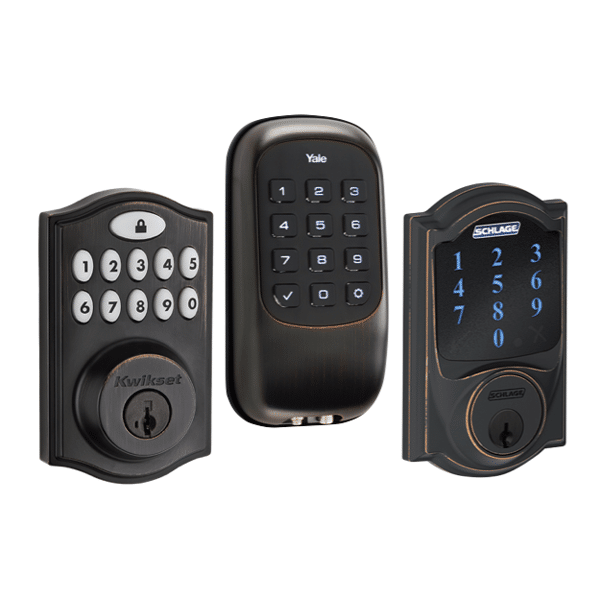
Smart Locks
Mark Camello
Latest posts by Mark Camello (see all)

Introduction to Smart Locks

What Are Smart Locks?

Let’s face it, traditional locks are old school. You fumble for keys, sometimes lose them, and worse—handing one out means giving up full control. Smart locks turn that on its head. These are electromechanical locks designed to perform locking and unlocking operations when it receives commands from an authorized device. Think smartphones, tablets, or voice assistants like Alexa or Google Assistant.

Smart locks eliminate the need for physical keys. You can unlock your front door from across the world, create temporary access codes for guests, or even get alerts when someone enters or leaves your home. It’s no wonder they’re becoming a staple in modern smart homes.

They’re typically powered by batteries, so even in power outages, they still function. And many smart locks allow manual key access just in case. Whether you want better security, more convenience, or just a cool gadget to impress guests—smart locks deliver all that and more.

Brief History and Evolution of Smart Locks

Believe it or not, the concept of smart locks has been around since the early 2000s. Back then, it was mostly biometric locks used in high-security environments. Fast-forward to today, and smart locks have evolved into sleek, affordable, and highly versatile home security devices.

With the rise of smartphones, cloud computing, and smart home ecosystems, the technology behind smart locks exploded. Early adopters were tech enthusiasts and security-conscious homeowners. Today, you’ll find smart locks in everything from Airbnbs to apartment buildings to commercial offices.

Modern smart locks offer features like facial recognition, remote locking, user tracking, and integrations with your home’s thermostat, lights, and even garage door openers. The rapid evolution of IoT (Internet of Things) has made smart locks not only smarter but also safer and more accessible.

How Smart Locks Work

Connectivity Options (Bluetooth, Wi-Fi, Z-Wave, Zigbee)

So, how do these locks actually talk to your phone or smart speaker? It all comes down to connectivity. Most smart locks use one (or more) of these wireless protocols: Bluetooth, Wi-Fi, Z-Wave, or Zigbee.

  • Bluetooth: Great for short-range use. When you approach your door, the lock detects your phone and unlocks automatically. Very energy-efficient but limited to proximity.

  • Wi-Fi: This allows full remote access. Want to unlock your door from across the city? Wi-Fi-enabled smart locks got you covered. Downside? They drain battery faster.

  • Z-Wave/Zigbee: Popular in smart home ecosystems. These protocols are used to connect to a hub like Samsung SmartThings or a Z-Wave bridge. Excellent for full smart home integration, but you need extra hardware.

Each has its strengths and weaknesses. Choosing the right one depends on your setup and how connected you want your smart lock to be.

Integration with Smart Home Systems

Imagine this: You say, “Hey Google, I’m home,” and your lights turn on, thermostat adjusts, and your door unlocks. That’s the magic of smart home integration.

Most top-tier smart locks integrate seamlessly with platforms like Amazon Alexa, Google Home, and Apple HomeKit. Some even pair with smart cameras and doorbells, so you can see who’s at the door and unlock it without lifting a finger.

Integration allows automation, like auto-locking at night or unlocking when your phone enters a geofenced area. It’s not just about locking your door—it’s about making your entire home smarter and more responsive to your lifestyle.

Benefits of Smart Locks

Convenience and Keyless Entry

Let’s be real—losing keys is a nightmare. With smart locks, that’s a problem of the past. You can walk up to your door and it unlocks automatically, use a keypad to enter a code, or simply tap an app.

You can also forget the hide-a-key rock in your yard. Share access codes with friends, family, or dog walkers—then revoke access whenever you want. It’s perfect for Airbnb hosts too, who no longer need to meet guests just to hand over keys.

No more juggling groceries while trying to find your keys. No more lockouts because your kid forgot theirs. Smart locks turn everyday annoyance into effortless convenience. You’ll wonder how you ever lived without one.

Remote Access and Control

One of the biggest game-changers with smart locks is remote access. Imagine you’re at work and a package arrives. Your delivery person calls, and instead of missing it, you unlock the door from your app, let them in, then lock it again—all in seconds.

Many smart locks also support remote notifications. You’ll know when your kids get home from school, when your house cleaner arrives, or if someone tries to access your door.

Some locks even offer scheduling. Want the door to auto-lock every day at 10 PM? Done. Want a code that only works on Wednesdays between 2 and 4 PM? Easy.

Improved Security Features

Smart locks offer more than just convenience—they step up your home’s security game too. Traditional locks can be picked or bumped, but smart locks offer multiple layers of digital protection. Most models are equipped with encryption, tamper alarms, and auto-locking features.

Some even notify you of suspicious activity, like multiple failed code attempts. You can also get alerts when the door is left unlocked for too long. That kind of real-time feedback is something a deadbolt just can’t do.

Additionally, smart locks make it easier to manage access. You can see who’s come and gone, restrict access to specific times, or grant one-time codes. It’s a smart move for anyone who values both control and peace of mind. And let’s not forget—many models still have a physical key option as a backup.

Activity Monitoring and Alerts

Want to keep tabs on who’s coming and going? Smart locks let you do just that. Every time someone unlocks your door, it’s logged in the app. Some systems even take it a step further and send instant push notifications.

You can customize these alerts to track specific users. Curious if your teenager made it home before curfew? Set an alert for their code. Want to ensure the cleaner arrived on time? Check the app history.

Advanced smart locks sync with cameras, so you can view video clips alongside entry logs. This turns your door into a digital checkpoint—ideal for busy families, rental hosts, or small business owners.

These alerts aren’t just for curiosity either—they’re an extra layer of security, helping you catch unusual activity before it becomes a problem.

Types of Smart Locks

Deadbolt Smart Locks

These are the most common type of smart locks, and for good reason. Deadbolt smart locks replace or augment your existing deadbolt mechanism, making them easy to install and compatible with most residential doors.

Some models fully replace the deadbolt, while others retrofit over the existing one, offering a hybrid of smart and traditional features. Deadbolt smart locks often come with keypads, fingerprint sensors, or remote app control.

The best part? You don’t need to be a tech wizard to install one. Most systems are DIY-friendly and can be set up in under 30 minutes. Whether you’re upgrading your primary residence or outfitting a rental, deadbolt smart locks strike the perfect balance between function and flexibility.

Lever Handle Smart Locks

Lever handle smart locks are mostly used for interior doors—think offices, bedrooms, or storage rooms. These locks combine a handle and a locking mechanism in one unit, providing keyless access without replacing the entire door hardware.

They’re especially popular in commercial environments where internal security matters just as much as the front door. And because they come in various styles, you won’t have to sacrifice aesthetics for functionality.

Some lever handle locks also include card or fob access, which is ideal for hotels or shared workspaces. They’re not typically used on exterior doors unless paired with a deadbolt, but they’re still a valuable part of a fully secure smart home setup.

Retrofit Smart Locks

Already love your current lock but want to make it smarter? That’s where retrofit smart locks come in. These devices attach to your existing deadbolt from the inside, leaving the exterior hardware unchanged.

This means you can keep your traditional key and lock look—perfect for rental properties, apartments, or heritage homes where you don’t want to make drastic changes.

August and Lockly are leaders in the retrofit game, offering compact models that provide all the bells and whistles: remote control, auto-locking, guest access, and more.

Retrofit options are usually the easiest to install and don’t require any drilling or major modifications. If you’re new to smart home tech, this is a hassle-free way to dip your toes in.

Mortise Smart Locks

Mortise smart locks are the heavyweights of the smart lock world. They’re designed for high-security applications and combine the locking bolt and handle into one integrated unit. These locks are more common in commercial buildings or luxury homes.

Mortise locks are typically larger and more complex to install, often requiring a professional or someone handy with tools. But in return, you get unparalleled durability, enhanced security features, and often a more sophisticated look.

They also support advanced access controls, like multiple user credentials, RFID, and dual authentication. If you need serious security and don’t mind a bit more effort upfront, mortise smart locks are a rock-solid investment.


Features to Look for in a Smart Lock

Biometric Authentication

Biometric tech is where smart locks really flex their muscles. Fingerprint scanners are becoming a standard feature in high-end models—and they’re as fast as they are secure. You can unlock your door in a second with just your fingertip. No codes to remember, no app to open, just a quick tap.

This feature is especially useful for kids or elderly family members who might struggle with smartphones or remembering codes. It also adds a layer of personalization—only authorized fingerprints are accepted, and you can manage access from your app.

Some smart locks are even experimenting with facial recognition and voice identification. While still in early stages for mass use, these features point to a future where biometric security is the new norm. If you want that extra edge in protection and simplicity, biometric smart locks are the way to go.

Auto-Locking and Unlocking

Ever leave the house and wonder, “Did I lock the door?” With auto-locking features, that worry becomes obsolete. Smart locks can automatically lock the door after a set period—30 seconds, a minute, or five, depending on your settings.

Even cooler? Some models use geofencing to detect when your phone leaves the area and automatically lock the door. When you return, the same tech senses your approach and unlocks it for you. Hands-free, hassle-free.

This is a game changer for busy families or people with packed schedules. It’s also ideal for those prone to forgetfulness (no shame in that!). With auto-locking and unlocking, your front door becomes one less thing to stress over.

Temporary Access and Guest Codes

One of the most underrated features of smart locks is the ability to create temporary access codes. Got guests visiting for the weekend? Give them a unique code that expires when they leave. Expecting a package? Set a one-time use code for the delivery driver.

For Airbnb hosts or short-term rentals, this is a lifesaver. You can create and delete codes remotely, without needing to be physically present. It keeps your property secure while offering maximum convenience to your guests.

You can also set schedules—like allowing the dog walker access only between 1 PM and 2 PM on weekdays. And best of all, you get notifications when each code is used, so you always know who’s coming and going.

Battery Life and Backup Options

Most smart locks are battery-powered, and battery life varies based on usage, features, and connection type (Wi-Fi typically drains faster than Bluetooth). But on average, you can expect anywhere from 6 months to a full year on a single set of AA batteries.

Many smart locks have battery indicators in the app that alert you well in advance when it’s time to change them. Some even send email or push notifications as a reminder. So, you’re never caught off guard.

But what happens if the battery dies? Most locks have backup options like:

  • A physical key override

  • An external 9V battery terminal to temporarily power the lock

  • Emergency USB-C charging ports

These fail-safes ensure you’re never truly locked out, even if you forget to replace the batteries in time.


Top Smart Lock Brands and Models

August Smart Lock

August has been a trailblazer in the smart lock space. Their products are sleek, easy to install, and loaded with features. The August Wi-Fi Smart Lock, for instance, works with Alexa, Google Assistant, and Apple HomeKit—and it retrofits onto your existing deadbolt.

The auto-unlock and DoorSense technology are standout features. You’ll know whether the door is fully closed and locked—no guessing. It’s a solid pick for renters and homeowners alike.

Schlage Encode

Schlage is known for rock-solid security, and the Encode is no exception. This Wi-Fi-enabled smart lock doesn’t need a hub, making it super easy to set up. It features a built-in alarm, fingerprint-resistant touchscreen, and works with Amazon Key, allowing secure in-home deliveries.

With ANSI Grade 1 certification, it’s one of the most secure smart locks on the market. It’s great for families who want peace of mind without sacrificing convenience.

Yale Assure Lock

Yale’s Assure series combines elegance with cutting-edge functionality. Available with a touchscreen or physical keypad, it offers keyless entry, remote access, and works with voice assistants.

The Assure Lock SL is especially popular—it’s slim, modern, and packed with features like auto-lock, low battery alerts, and Z-Wave compatibility for home automation integration. If you want a good mix of style and substance, this one hits the sweet spot.

Level Lock

Level has taken a completely different approach. Instead of changing how your lock looks, they hide the smart tech inside the existing hardware. That means you keep your current key and aesthetic, while gaining all the benefits of a smart lock.

It supports Apple HomeKit and offers features like auto-unlock, shared access, and more—all hidden in a beautifully engineered package. Ideal for minimalists or anyone who wants top-tier tech without changing their door’s appearance.


Installation and Setup

DIY vs. Professional Installation

One of the big questions people ask is: “Can I install a smart lock myself?” The answer is—most likely, yes. Many smart locks are designed for easy DIY installation and come with step-by-step instructions, sometimes even video tutorials via the manufacturer’s app.

Most retrofit locks or those replacing standard deadbolts can be installed using just a screwdriver. No drilling, no wiring, and no professional skills required. These options are perfect for renters or first-timers dipping their toes into smart home tech.

However, there are situations where hiring a professional might be a better idea. Mortise locks or locks with advanced wiring (for integrated alarms or intercom systems) might need a locksmith or technician. Plus, a pro can ensure everything is secure and working smoothly.

So, it really depends on your comfort level and the type of smart lock you choose. DIY is cheaper, but pro installation brings peace of mind—especially for high-end systems.

Compatibility with Existing Doors

Not every smart lock fits every door. Before you make a purchase, you need to consider compatibility. Is your door pre-drilled for a standard deadbolt? Does it have a mortise lock setup? What’s the thickness of the door?

Most manufacturers provide a compatibility guide—make sure to check that before buying. Retrofit models are the most forgiving; they’re designed to fit over most existing locks without changing the outer appearance.

If you have an older or custom door, you might need a smart lock with adjustable faceplates or one that supports a wider range of door sizes and types. Always measure before you order, and don’t be afraid to contact customer support if you’re unsure.


Smart Lock Security Concerns

Hacking Risks and Cybersecurity

Yes, smart locks are secure—but like any connected device, they can be vulnerable if not properly protected. The biggest concern for many homeowners is hacking. If someone gains access to your lock through your Wi-Fi or app, it could spell trouble.

To minimize risk, smart lock companies use advanced encryption protocols (AES-128 or higher), two-factor authentication, and frequent firmware updates. But it’s also on you to keep your passwords strong, avoid sharing access codes, and keep your devices updated.

Avoid using public Wi-Fi to manage your lock and use secure, private networks. Look for locks with built-in security features like tamper alarms, lockout modes after too many failed attempts, and optional audit trails that log access history.

The bottom line? No system is 100% hack-proof, but smart locks are as secure—if not more so—than traditional locks when used properly.

Tips for Enhancing Smart Lock Security

  • Use two-factor authentication (2FA) on your lock’s mobile app.

  • Create strong, unique passwords and change them periodically.

  • Regularly update firmware through the app to patch vulnerabilities.

  • Limit user access—only give codes to people you trust and remove them when no longer needed.

  • Disable unused integrations to minimize your exposure to external risks.

  • Invest in a secure Wi-Fi router with up-to-date encryption and protection features.

These steps aren’t just best practices—they’re essential for making the most of your smart lock’s capabilities without opening the door (pun intended) to unwanted digital intrusions.


Cost of Smart Locks

Pricing Range

Smart locks can range in price from $100 to $400 or more, depending on the brand, features, and connectivity. Entry-level models with keypad access or Bluetooth typically cost around $100–$150. These are great for basic keyless entry.

Mid-tier models with Wi-Fi, remote access, and integration capabilities usually fall in the $150–$250 range. They offer a solid mix of convenience and security, suitable for most homeowners.

High-end smart locks, especially those with biometric access, camera integration, or mortise mechanisms, can cost $300 and up. While pricey, these models are built for serious security and full smart home integration.

Value for Money

Is it worth spending that much on a lock? Think about it this way: a smart lock isn’t just a gadget—it’s a security system, convenience tool, and home automation gateway all in one.

If you frequently host guests, manage rental properties, or just love the idea of a key-free life, smart locks are a worthwhile investment. Many come with warranties and updates, so you’re not just buying hardware—you’re getting long-term value and tech support.


Use Cases for Smart Locks

Residential Homes

The most common use of smart locks is in homes. Whether it’s letting your kids in after school, opening the door for a friend while you’re at work, or never worrying about lost keys again, they simplify everyday life.

They’re especially useful for families who want to monitor who comes and goes—and for busy homeowners who love the ability to lock or unlock the door from anywhere.

Rental Properties and Airbnb

For short-term rentals, smart locks are game-changers. They eliminate the need for physical key exchanges, allow for scheduled guest access, and offer audit trails to ensure accountability.

Hosts can set and expire codes for each guest, making property management safer and more streamlined. Some locks even integrate with booking platforms to automatically generate codes when a reservation is made.

Office and Commercial Use

Businesses are catching on too. Offices, co-working spaces, and storage rooms benefit from smart locks because they allow for strict access control, especially outside regular business hours.

Admins can assign employee access levels, track entries, and avoid rekeying locks every time staff changes. For high-traffic areas, smart locks reduce overhead while increasing operational control.


Common Problems and Troubleshooting

Connectivity Issues

One of the most common complaints? “My smart lock won’t connect.” This is usually due to Wi-Fi or Bluetooth problems. The solution might be as simple as restarting your router or moving the smart hub closer to the lock.

Apps sometimes require location access or specific permissions, so make sure they’re properly set up. Keep your device software and lock firmware up to date to prevent bugs.

App and Software Glitches

Apps can freeze, crash, or fail to sync with your lock. Clearing cache, reinstalling the app, or logging in again often resolves these issues. Check for updates regularly—many bugs are fixed in newer versions.

Battery-Related Problems

Smart locks that die suddenly usually didn’t give enough warning—or the user ignored the alert. Always keep spare batteries handy and check battery health in the app.

If the battery dies completely, use the backup options: keys, external battery terminals, or USB ports depending on the model.


Future Trends in Smart Lock Technology

AI Integration

Smart locks are getting smarter—literally. AI is starting to play a role in anticipating user behavior, like unlocking as you approach based on your habits, or flagging unusual activity patterns.

In the future, locks might even learn to recognize your voice tone, face, or gestures using AI-enhanced sensors. The goal? Faster, safer, more intuitive security.

Enhanced Biometric Capabilities

Fingerprint scanners are just the beginning. Expect retina scans, voice recognition, and even behavioral biometrics (like how you walk) to enter the mix.

These technologies will not only boost security but make access more seamless than ever before. Imagine unlocking your door just by walking up to it—no touch, no app, no key.


Conclusion

Smart locks are more than just a trendy gadget—they’re the future of home security. Offering unbeatable convenience, better access control, and powerful integrations, they’re a no-brainer for anyone looking to upgrade their lifestyle and safety.

Whether you’re managing a busy household, hosting Airbnb guests, or just tired of carrying keys, there’s a smart lock for every door and every budget. Just make sure you pick one that suits your needs, keep it updated, and enjoy the peace of mind that comes with smarter living.


FAQs

1. Are smart locks safer than traditional locks?


Yes, when used correctly. Smart locks use encryption, multi-factor authentication, and remote monitoring, making them more secure than traditional locks in many cases.

2. Can smart locks be hacked?


Technically, yes—but with strong passwords, updated firmware, and secure networks, the risk is minimal. Choose reputable brands with good security protocols.

3. Do smart locks work without internet?


Some do! Bluetooth and Z-Wave models can function offline. However, remote features like notifications and unlocking from afar need internet access.

4. How long do smart lock batteries last?


On average, 6 months to a year. Wi-Fi models may drain faster. Always check battery life in your app and keep spares handy.

5. Can I use a smart lock with my existing door?


Absolutely. Most smart locks are designed to work with standard deadbolts and doors. Just make sure to check compatibility before buying.

SOURCES:

  1. Yale.com
  2. UChicago.edu
  3. Texas Instruments
  4. PCMag.com

About All Action Alarm: Your Trusted Partner in Home Security Solutions

When it comes to protecting your home and loved ones, there’s no room for compromise. At All Action Alarm, we take home security to the next level by offering top-tier protection with cutting-edge technology and expert monitoring services that you can rely on. As a leader in the security industry, we’re committed to keeping homes and businesses safe, providing peace of mind 24/7.

Don’t wait for an emergency to take action. Protect your home and family with the best in the business.  Call(631) 549-7225  to schedule your consultation, or visit allactionalarm.com to learn more about our services.

Your safety is our top priority.

Check out Burglary Prevention and Get Started with All Action Alarm Today!