
Best Security Cameras for Your Home

- Best Doorbell Camera System - January 19, 2026
- Best Smart Home Alarm System - January 12, 2026
- Smart Lighting System for Home - January 5, 2026
Introduction
Why Home Security Cameras Are a Must in 2025
Home security is no longer a luxury—it’s a necessity. Whether you live in a quiet suburb, a bustling city, or a secluded countryside, protecting your home, family, and valuables is more important than ever. In 2025, security threats aren’t limited to just break-ins. Package thefts, property damage, suspicious activity, and even privacy invasions have all become part of everyday risks. That’s where having the best security cameras for your home makes all the difference.
Gone are the days when surveillance meant grainy footage from bulky, outdated systems. Today’s security cameras are smarter, sharper, and more accessible than ever. With advancements like AI-powered motion detection, real-time alerts, HD video, cloud storage, and even facial recognition, modern systems allow you to monitor your property from anywhere in the world—right from your smartphone.
But here’s the thing: the market is flooded with options. Some are powerful but expensive. Others are budget-friendly but lack features. Some are perfect for outdoor monitoring, while others are best suited for keeping an eye on the living room or nursery. That’s why understanding what to look for and which models are worth your money is crucial.
In this comprehensive guide, we’ll explore the best home security cameras available in 2025, break down the key features you should consider, and help you find the right fit for your specific needs. Whether you want to keep an eye on your front door, protect your backyard, or simply check in on your pets while you’re away, there’s a perfect camera out there waiting for you.
Let’s dig in and find out which security camera setup will give you that all-important peace of mind—because feeling safe in your own home shouldn’t be optional.
Types of Home Security Cameras
Indoor Cameras
Indoor cameras are designed to monitor the inside of your home, giving you a close-up view of what’s happening when you’re not around. They’re perfect for keeping tabs on kids, elderly family members, pets, or house cleaners. These cameras usually offer compact designs, easy setup, and discreet aesthetics so they blend into your home décor.
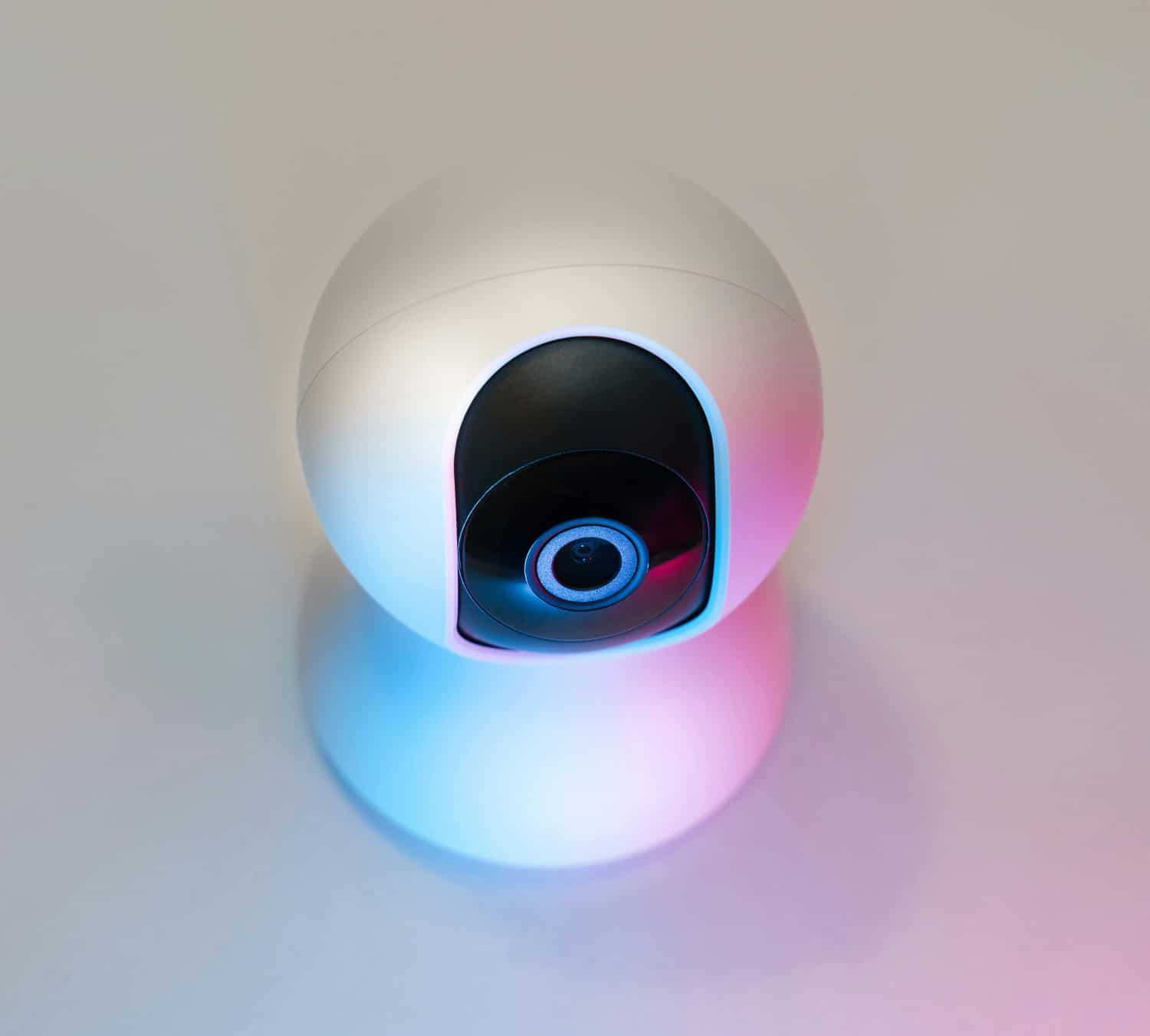
Many indoor models come equipped with features like two-way audio, motion detection, night vision, and even pan-and-tilt functions that let you remotely control the camera’s view. Some smart cameras can also recognize familiar faces or alert you if something unusual happens—like a door opening when it shouldn’t.
They’re usually connected via Wi-Fi and work with popular smart home systems like Amazon Alexa or Google Assistant. Best of all, they don’t require complicated wiring or professional installation. Just plug them in, connect to your app, and you’re good to go.
However, indoor cameras do come with limitations. They typically don’t have weatherproofing and are not designed to function in extreme lighting or temperatures. Plus, privacy can be a concern—so always choose a brand with robust encryption protocols and data protection policies.
Whether you place them in your living room, hallway, or baby’s nursery, indoor cameras are a great first step to securing what matters most inside your home.
Outdoor Cameras
Outdoor security cameras are your home’s first line of defense. Positioned around entrances, garages, backyards, and perimeter fences, these cameras are built to withstand the elements while delivering sharp, detailed video—day or night.
In 2025, the best outdoor cameras offer 4K resolution, color night vision, and AI-powered detection that can differentiate between people, animals, vehicles, and even packages. That means fewer false alerts from passing cars or swaying trees, and more accurate notifications when someone actually steps onto your property.
Durability is a big deal here. Outdoor models are rated with IP65 to IP67 weatherproof certifications, meaning they can endure rain, snow, wind, and even scorching summer heat. Brands like Arlo, Eufy, and Ring have done an excellent job of balancing rugged hardware with sleek design—so your home stays protected without looking like a prison.
Many models also include built-in spotlights, siren alarms, and two-way audio, allowing you to scare off potential intruders or speak to delivery personnel in real time. Want even more protection? Go for models with 24/7 recording capabilities and cloud backup so you can retrieve footage instantly if needed.
Outdoor cameras typically mount on walls or ceilings and may require a ladder for installation. Depending on your preference, you can choose between wired setups (for consistent power) or wire-free options (with long-lasting batteries or solar panels).
If you want complete home surveillance, placing outdoor cameras at all entry points is a no-brainer. They not only act as a powerful deterrent but also give you critical visual evidence should anything suspicious occur.
Doorbell Cameras
Doorbell cameras have exploded in popularity—and for good reason. These clever devices combine a traditional doorbell with a smart security camera, giving you live video and two-way audio from your front porch right on your phone.
Perfect for monitoring deliveries, visitors, and potential intruders, doorbell cameras are especially useful for deterring package theft, one of the fastest-growing crimes in urban and suburban areas. When someone rings the bell (or even approaches the door), you’ll get an instant notification—along with a video stream to see and speak with them in real time.
Top-tier models like the Ring Video Doorbell Pro, Nest Doorbell, or Eufy Video Doorbell Dual offer features like HD or 2K resolution, AI-based motion detection, facial recognition, and dual-cam viewing angles—so you can see both the person and any packages left at your doorstep.
Some models run on hardwired power, connecting directly to your existing doorbell wiring. Others are battery-powered, making them easier to install in rentals or older homes without rewiring. Newer options even include pre-roll video recording, so you can see what happened just before someone rang the bell.
If convenience, peace of mind, and porch protection are priorities, a doorbell camera is a must-have part of your home security setup.
Wireless vs. Wired Cameras
When choosing between wireless and wired security cameras, it’s not just a matter of convenience—it’s a matter of coverage, reliability, and long-term value.
Wireless cameras are the go-to for many homeowners due to their easy installation, sleek design, and flexibility. These systems connect via Wi-Fi and typically run on rechargeable batteries or solar panels. They’re great for renters or anyone looking to avoid the hassle of drilling holes or running cables. Brands like Arlo, Wyze, and Eufy offer powerful wireless models that don’t skimp on features.
But there’s a trade-off. Wireless systems depend heavily on your home Wi-Fi network. If your internet signal is weak or cuts out often, so will your surveillance. Battery maintenance is another consideration—though modern systems can go months without a charge, you’ll need to stay on top of power levels.
Wired cameras, on the other hand, are known for their reliability and continuous power. These connect via Ethernet or coaxial cables and are ideal for homeowners who want 24/7 video recording without worrying about battery life. They’re also harder to hack and typically offer better video stability.
However, wired setups are more labor-intensive to install and may require professional help—especially for multi-camera systems across large properties. They’re best suited for permanent installations in homes you own rather than rent.
In short:
-
Choose wireless for convenience and flexibility.
-
Choose wired for rock-solid reliability and continuous power.
A hybrid system that uses both types can also offer the best of both worlds, covering all corners of your home efficiently.
Essential Features to Look For
High-Definition Video Quality
If your security camera doesn’t deliver clear video, it won’t do much good. That’s why HD video quality is a non-negotiable feature. Whether you’re identifying a package thief, checking in on your kids, or scanning a dark alley at night, crystal-clear footage can make all the difference.
In 2025, 1080p (Full HD) is the bare minimum. However, 2K and 4K resolution options are quickly becoming standard, especially for outdoor and front-door surveillance. Higher resolutions mean better detail, especially when zooming in to identify faces or license plates.
Pay attention to frame rates too. A camera that records at 30 frames per second (FPS) provides smoother, more accurate video playback than one at 15 FPS. This is crucial when trying to track motion or fast-moving activity.
Also, consider digital zoom versus optical zoom. Digital zoom crops the image and can reduce clarity, while optical zoom maintains image quality even when zoomed in.
If you’re investing in home security, go for cameras with 2K or higher resolution, wide dynamic range (WDR) to handle tricky lighting conditions, and HDR for extra clarity.
Whether you’re reviewing recorded footage or watching a live feed, high-definition video makes sure you don’t miss a thing.
Motion Detection and Smart Alerts
Motion detection is what turns a basic camera into a smart home security system. It’s the feature that keeps your camera from recording hours of uneventful footage and instead focuses only on what’s important. When motion is detected—whether it’s a person walking by, a car pulling into the driveway, or a package being dropped off—you get an instant alert sent to your smartphone or email, often with a short video clip attached.
But not all motion detection is created equal. Entry-level systems may trigger alerts from any movement, including pets or passing shadows. This leads to false alarms, which can be frustrating and cause you to start ignoring notifications altogether.
That’s why it’s essential to choose cameras with smart motion detection, powered by AI. These advanced systems can differentiate between people, vehicles, animals, and even specific events like a package being delivered. Some can even track motion across multiple zones, so you can customize which parts of the view will trigger alerts—like your front porch but not the street.
For maximum control, look for systems with:
-
Customizable motion zones
-
Sensitivity adjustment
-
Smart filters for people, pets, and cars
-
Facial recognition (in higher-end models)
Smart alerts ensure that you’re only notified when it actually matters. And in combination with cloud storage, they let you review and act quickly, whether you’re at home or miles away.
For homes in busy areas or shared entrances like apartment buildings, motion detection with AI filtering is essential. It prevents alert fatigue and ensures you get accurate, real-time updates when something out of the ordinary happens.
Night Vision Capabilities
Security doesn’t stop when the sun goes down—and neither should your cameras. Night vision is one of the most critical features of any home security camera, allowing it to capture clear footage in low-light or no-light environments.
Basic night vision cameras use infrared (IR) LEDs to illuminate dark areas in black and white. While this is better than nothing, the clarity can be limited—especially at a distance or when trying to identify faces.
The latest generation of cameras now features color night vision, which delivers full-color images even in near-total darkness. This is achieved through a combination of low-light sensors, large apertures, and ambient light optimization. Some models, like Arlo’s Color Night Vision cameras, can even illuminate the scene with a built-in spotlight for better visibility and color accuracy.
Here’s what to look for in a solid night vision setup:
-
IR range of at least 25–30 feet for indoor use, 50–100 feet for outdoors
-
Color night vision or Starlight sensors for improved clarity
-
Automatic infrared switching based on lighting conditions
If your property has dark corners, long driveways, or low lighting at entry points, investing in cameras with strong night vision is a must. It ensures that your surveillance system stays effective 24/7, not just during daylight hours.
Two-Way Audio
Imagine being able to talk to someone at your door even when you’re halfway across town. That’s exactly what two-way audio allows you to do. With a built-in microphone and speaker, this feature enables real-time communication through your camera’s app.
Two-way audio is incredibly useful for:
-
Greeting guests or delivery drivers
-
Deterring intruders by speaking directly to them
-
Checking in on kids or elderly family members
-
Warning off suspicious people or animals
Most modern security cameras, especially those used for front doors, porches, and interiors, come with this functionality. Brands like Ring, Arlo, and Google Nest offer crisp audio quality with minimal lag, thanks to improved Wi-Fi chips and noise-cancellation features.
Just make sure the model you choose has:
-
A high-sensitivity microphone
-
A loud and clear speaker
-
Echo cancellation for smooth conversations
Two-way audio transforms your security camera into a virtual intercom system, adding a layer of convenience and control that basic surveillance just can’t match.
Top-Rated Home Security Camera Brands
Arlo
Arlo has become a top player in home security—and for good reason. Known for its wire-free, smart, and beautifully designed cameras, Arlo delivers solid performance across a range of models. From the entry-level Essential series to the flagship Pro 5S 2K, Arlo cameras come equipped with HD or 2K resolution, color night vision, smart detection, and two-way audio.
One of Arlo’s strongest features is its intuitive mobile app, which provides instant alerts, live video streaming, and cloud storage access. Arlo also integrates seamlessly with Amazon Alexa, Google Assistant, Apple HomeKit, and Samsung SmartThings—making it a perfect choice for smart homes.
They offer flexible cloud storage plans, optional local storage with SmartHub, and even solar panel accessories for eco-friendly charging.
While Arlo cameras are on the pricier side, you’re paying for premium build quality, cutting-edge tech, and one of the most user-friendly systems on the market.
Ring
Ring revolutionized home security with its Video Doorbell, and since then, it has expanded into a complete suite of home surveillance products. Today, Ring offers a wide variety of doorbell cameras, floodlight cams, indoor cams, and outdoor smart cameras—all designed with simplicity, smart features, and affordability in mind.
Ring’s main strength lies in its seamless integration with Amazon Alexa. You can use voice commands like, “Alexa, show me the front door,” and immediately view live feeds on Echo Show devices. Their mobile app is also intuitive, allowing users to monitor live video, review recordings, and manage devices from anywhere.
Most Ring cameras come with:
-
1080p HD video
-
Motion detection with customizable zones
-
Two-way talk
-
Infrared night vision
-
Cloud storage through Ring Protect subscription plans
Ring also provides real-time crime and safety alerts through its Neighbors app, connecting users with law enforcement and their local community.
However, Ring’s biggest downside is its lack of free video storage—you’ll need a Ring Protect subscription to access recordings. Still, for homeowners who want easy setup, solid video quality, and dependable smart home features, Ring remains a top contender.
Google Nest
Google Nest offers some of the most elegant and intelligent home security cameras on the market. Designed with minimalist aesthetics and cutting-edge AI, Nest cameras are ideal for homeowners who value both form and function.
The Nest Cam (Battery) is one of their most popular models, offering:
-
1080p HD video with HDR
-
Free 3-hour event history
-
AI-based alerts for people, animals, and vehicles
-
Two-way audio
-
Night vision
What sets Google Nest apart is its deep integration with Google Assistant and the Google Home ecosystem. Users can view feeds on Nest Hubs, get alerts through Google Assistant speakers, and even create routines that interact with other smart devices.
The Nest Aware subscription enhances features significantly, providing familiar face detection, sound detection (glass breaking, talking, barking), and 30–60 days of video history.
While Nest products tend to be more expensive and dependent on cloud services, their superior design, advanced AI, and excellent app experience make them a top-tier choice for smart homeowners.
Eufy
Eufy, a brand by Anker, is rapidly gaining popularity for offering affordable yet feature-rich security cameras—without mandatory monthly fees. Their cameras stand out because they include local storage, making them an attractive choice for privacy-conscious users who want to avoid cloud subscriptions.
The EufyCam 3 series, for example, offers:
-
4K Ultra HD video
-
Built-in solar panel
-
Expandable local storage via HomeBase 3
-
AI-powered human detection
-
Facial recognition
Eufy also supports two-way audio, color night vision, and motion-triggered recording. Their mobile app is user-friendly and works without needing an active internet connection (for local features).
Another major perk? The Eufy system is 100% wire-free and DIY-friendly, making it great for renters, small homeowners, and even cabins or vacation homes.
Privacy and affordability are Eufy’s trademarks. If you want smart security without being tied to monthly fees or cloud dependency, Eufy is a standout brand to consider.
Wyze
Wyze has carved a niche for itself by offering high-quality home security cameras at unbeatable prices. What started with the $20 Wyze Cam has now expanded into a full ecosystem of smart cameras, including the new Wyze Cam v4, which continues to deliver excellent value.
Despite their low price point, Wyze cameras include features like:
-
2.5K resolution (in v4)
-
AI-powered motion and sound detection
-
Color night vision
-
Local and cloud storage options
-
Two-way audio
Their cameras are compact, easy to install, and highly rated by DIY users. The Wyze app allows for multi-camera viewing, smart alerts, and smart assistant integration with Alexa and Google Assistant.
The optional Cam Plus subscription unlocks additional AI features like person detection, vehicle alerts, and unlimited cloud storage for a low monthly cost. But the beauty of Wyze is that you can still use many of their best features for free, making it perfect for budget-conscious buyers.
Wyze proves you don’t need to spend a fortune to secure your home—just choose smart.
Best Home Security Cameras of 2025
Arlo Pro 5S 2K
The Arlo Pro 5S 2K takes everything great about the previous Pro models and dials it up a notch. Designed for homeowners who want premium protection, this camera delivers 2K HDR video, color night vision, and dual-band Wi-Fi for a more stable connection.
Key features include:
-
Integrated spotlight and siren
-
Rechargeable battery with optional solar panel
-
Smart motion detection with person, vehicle, and animal alerts
-
Works with Alexa, Google Assistant, and HomeKit
-
Local and cloud storage options
What makes the Pro 5S truly shine is its multi-layered security, with Arlo SecureLink technology ensuring strong encryption and better device-to-hub communication—even if Wi-Fi goes down.
Though it comes at a higher price, its mix of performance, features, and flexibility make it one of the best cameras you can buy for your home in 2025.
Ring Spotlight Cam Plus
Aimed at homeowners who want outdoor visibility and intruder deterrence, the Ring Spotlight Cam Plus combines motion-activated lighting with sharp 1080p video and two-way talk.
Top features:
-
Adjustable motion zones
-
Infrared and color night vision
-
Built-in LED spotlights and siren
-
Works with Alexa
-
Battery, wired, and solar options available
What sets it apart is the bright spotlight that triggers during motion events—instantly deterring would-be intruders. It’s great for driveways, side yards, or garages. While full video review requires a Ring Protect plan, its affordability and effectiveness keep it at the top of the list.
Google Nest Cam (Battery)
The Google Nest Cam (Battery) is a sleek, intelligent, and highly adaptable camera ideal for both indoor and outdoor use. Designed with flexibility and smart integration in mind, it fits seamlessly into any Google-powered smart home.
What makes it a top pick?
-
1080p HDR video with a wide 130-degree field of view
-
Battery-powered with magnetic mount for easy placement
-
Free 3-hour event video history
-
Smart alerts for people, animals, and vehicles
-
Weather-resistant (IP54 rated) for outdoor use
The Nest Cam can be installed in minutes and is perfect for renters or homeowners who want a cable-free experience. With a Nest Aware subscription, you unlock familiar face detection, sound alerts (like glass breaking or smoke alarms), and extended video history up to 60 days.
Perhaps the biggest benefit is its deep Google Home integration. From voice controls via Google Assistant to syncing with Nest Hub displays, it turns your home into a truly smart security network. For those fully invested in Google’s ecosystem, this camera is a no-brainer.
EufyCam 3
If you’re looking for high-end performance without ongoing subscription costs, the EufyCam 3 is your best bet. This model delivers true 4K resolution and stores footage locally on the Eufy HomeBase 3, which supports up to 16TB expandable storage via hard drive.
Why it’s a standout:
-
Integrated solar panel for unlimited power
-
Facial recognition with built-in AI
-
Color night vision and motion alerts
-
Military-grade encryption
-
Works with Alexa and Google Assistant
It’s 100% wire-free and perfect for large properties or homeowners who want complete control over their data. The facial recognition learns familiar faces, sending specific alerts like “Mom is at the front door.” You can even add more cameras without additional monthly fees.
While the upfront cost is higher, the absence of cloud subscription requirements makes it cost-effective in the long run. EufyCam 3 is an excellent option for tech-savvy homeowners looking for full-featured, private, and powerful security.
Wyze Cam v4
If you’re shopping on a budget but still want reliable protection, the Wyze Cam v4 delivers more than you’d expect at its price point. Upgraded from its predecessors, this camera now supports 2.5K Quad HD resolution, making it one of the sharpest low-cost options out there.
Key benefits:
-
Color night vision with improved low-light performance
-
AI detection for people, packages, pets, and vehicles
-
Two-way audio
-
Supports microSD card for local storage
-
Free cloud event storage (12-second clips)
Wyze’s biggest strength is accessibility. You don’t need a subscription to get basic functionality, though Cam Plus unlocks advanced AI and unlimited recording. This model is also incredibly easy to set up and works well with Alexa and Google Assistant.
While it’s best suited for indoor or covered outdoor use (due to its limited weatherproofing), Wyze Cam v4 is ideal for apartments, starter homes, or as an add-on to a larger system. It’s proof that affordable doesn’t mean basic.
Smart Home Integration
Compatibility with Alexa, Google Assistant, and Apple HomeKit
Smart home integration can take your security setup from good to great. Today’s top security cameras are no longer standalone devices—they’re part of an interconnected ecosystem of lights, locks, alarms, and assistants.
Here’s how integration helps:
-
Voice commands: “Alexa, show the backyard camera” or “Hey Google, who’s at the door?”
-
Live feeds on smart displays like Echo Show, Nest Hub, or Apple TV
-
Automations and routines like turning on porch lights when motion is detected
Arlo, Ring, and Wyze work well with Alexa and Google Assistant, offering live view, alerts, and automation. Google Nest naturally performs best with Google Home, while Eufy supports both Alexa and Google with limited HomeKit compatibility.
Apple HomeKit users have fewer options, but EufyCam 2, Arlo Pro 3, and Logitech Circle View are solid picks. HomeKit Secure Video also adds encrypted storage in iCloud for enhanced privacy.
Smart integration adds convenience and proactive protection. Imagine your camera detects motion, sends you an alert, turns on a floodlight, and records the event—all without you lifting a finger.
Automation and Routines
With automation, your cameras become part of your daily home life. You can set up routines such as:
-
Arming cameras when you leave the house
-
Turning them off when you arrive home
-
Syncing with smart locks to start recording when the door unlocks
-
Triggering lights or sirens during motion detection
Many cameras also integrate with IFTTT (If This Then That) for advanced triggers and responses. For instance, if your doorbell detects a visitor after dark, your porch light could turn on and your indoor camera could start recording.
These kinds of routines not only enhance security but also comfort and efficiency. Once you experience home automation with your surveillance system, you’ll never want to go back.
Video Storage Options
Cloud Storage Plans
When it comes to storing your security footage, cloud storage is the most convenient option. It allows you to access your video recordings anytime, anywhere, and ensures your data is safe—even if the camera is damaged or stolen. Most major camera brands offer cloud-based services, usually through a monthly or yearly subscription.
Here’s what you can typically expect:
-
Event-based recording (clips only when motion is detected)
-
Timeline-based access to past events
-
Smart alerts and thumbnails
-
Download and share capabilities
-
Redundant off-site storage
Brands like Ring, Arlo, and Nest offer different tiers:
-
Ring Protect Basic: $3.99/month per device with 180-day storage
-
Arlo Secure: $4.99/month with 30 days of 2K or 4K cloud video
-
Nest Aware: $8/month with 30-day event history; Nest Aware Plus provides 60-day event history and 10 days of continuous video
Cloud storage is ideal if:
-
You travel frequently
-
You manage your home remotely
-
You want to keep video evidence off-site
However, it’s worth noting that cloud storage requires a strong and stable internet connection, and fees can add up over time. Still, the convenience and accessibility it provides often outweigh the cost.
Local Storage Alternatives
If you’re concerned about privacy, data control, or subscription fatigue, local storage is a great alternative. These systems store video recordings on-site via:
-
microSD cards
-
USB drives
-
Network Video Recorders (NVRs)
-
Dedicated HomeBases with expandable storage (like Eufy HomeBase 3)
Brands like Eufy, Reolink, and Wyze shine here. Many of their cameras offer:
-
On-device or in-home video storage
-
No monthly fees
-
Footage that stays private and offline
-
The ability to view videos directly from the app without uploading to the cloud
While local storage gives you control and avoids ongoing costs, it has some risks:
-
If the camera or storage hub is stolen, you may lose the footage
-
There are physical space limitations (e.g., 64GB or 256GB)
-
Backups require manual setup unless paired with a NAS (Network Attached Storage)
For the best of both worlds, consider hybrid storage systems that support both cloud and local options. That way, you keep important footage off-site but still enjoy instant access to live and recent recordings.
Power Sources and Battery Life
Battery-Powered vs. Plug-In Cameras
Power source matters. It determines your camera’s reliability, convenience, and where you can install it. Most security cameras today fall into one of two categories: battery-powered or plug-in.
Battery-powered cameras offer maximum flexibility. You can mount them almost anywhere—on trees, sheds, or ceilings—without worrying about wiring or proximity to outlets. This makes them ideal for outdoor or remote locations.
Top features:
-
Rechargeable lithium-ion batteries
-
Battery life ranging from 3 to 12 months
-
Mobile alerts for low battery
-
Quick-swap batteries or external chargers
Examples: Arlo Pro 5S, EufyCam 3, Nest Cam Battery
Plug-in cameras, on the other hand, are perfect for areas where constant power is available. You don’t have to worry about recharging, and these cameras often support features like 24/7 recording or higher video resolutions.
Examples: Ring Indoor Cam, Google Nest Cam Wired, Wyze Cam v4
So which is better?
-
Choose battery-powered if you want wireless flexibility and quick installation
-
Choose plug-in if you want uninterrupted service and more robust features
Many homeowners use a combination of both—plug-in cameras indoors, and battery-powered units outdoors.
Solar Power Options
If you’re tired of recharging batteries or don’t have outdoor outlets, solar-powered cameras are a game-changer. They harness the sun’s energy to charge your cameras continuously, offering hands-free maintenance and eco-friendly power.
Brands like Arlo, Eufy, and Reolink offer solar panels compatible with their wireless camera models. Some, like the EufyCam 3, come with built-in solar panels, giving you months—or even years—of maintenance-free security.
Benefits:
-
Sustainable, green energy
-
Ideal for hard-to-reach outdoor areas
-
Works even in overcast conditions with battery backup
Make sure to:
-
Install panels in direct sunlight
-
Clean them occasionally for efficiency
-
Pair them with low-power cameras for best results
If you live in a sunny region and want to reduce upkeep, solar power is one of the smartest investments you can make for your home surveillance system.
DIY vs. Professional Installation
Pros and Cons
When setting up a home security system, one of the biggest decisions you’ll make is whether to install it yourself or hire a professional. Both routes have their benefits and drawbacks, and the best choice often depends on your tech comfort level, budget, and the complexity of your setup.
DIY Installation Pros:
-
Cost-effective – Save money by avoiding professional service fees
-
Flexible setup – Place cameras where you want, when you want
-
Instant use – No need to wait for a technician’s schedule
-
Easy mobile app integration – Most modern systems are plug-and-play
DIY Installation Cons:
-
Steep learning curve for tech beginners
-
Potential for poor placement or coverage gaps
-
No guaranteed support if something goes wrong
Professional Installation Pros:
-
Expert placement for maximum coverage and efficiency
-
Wiring and mounting handled for you
-
Seamless integration with alarms, sensors, and smart home hubs
-
Often comes with warranty and support
Professional Installation Cons:
-
Higher upfront cost (often $200–$1,000+)
-
Requires scheduling and sometimes recurring service fees
-
Less flexible if you want to make changes later
In 2025, most battery-powered and wireless systems are designed with DIYers in mind. Brands like Arlo, Wyze, and Eufy emphasize easy setup, while Ring even provides step-by-step video tutorials via their app.
If your setup is large, wired, or part of a full smart home system—including alarms, locks, or door/window sensors—a professional installation may save time and ensure reliability.
Best Cameras for Easy Setup
If you’re leaning toward DIY, certain camera models are far easier to install than others. Here are some of the best for hassle-free setup:
-
Wyze Cam v4: Plug-and-play with magnetic base, under 5 minutes to install
-
Arlo Pro 5S 2K: Wire-free and mounts easily with a screw kit or magnetic bracket
-
EufyCam 3: No monthly fee, wire-free, and solar-powered for long-term setup
-
Ring Video Doorbell 4: Comes with all necessary tools, and installation takes under 15 minutes
-
Google Nest Cam (Battery): Magnetic wall mount and intuitive app guidance
These cameras come with mobile apps that walk you through the installation process step-by-step. Some even include level tools, mounting templates, and in-app diagnostics to make sure everything’s working perfectly.
For renters, make sure to choose cameras that don’t require drilling or complex mounts—most indoor cams can be set on shelves or mounted with adhesive tape or magnetic bases.
Privacy and Data Security
Encryption Standards
In a time when smart devices are increasingly connected to the internet, protecting your video footage and personal data is more important than ever. A top-notch security camera isn’t just about video quality—it also needs to keep your data safe from hackers and unauthorized access.
Look for cameras that offer:
-
End-to-end encryption (E2EE)
-
Two-factor authentication (2FA)
-
Secure cloud storage with AES-256 bit encryption
-
Regular firmware updates from trusted manufacturers
Brands like Eufy, Arlo, Google Nest, and Apple’s HomeKit Secure Video use some of the highest levels of encryption available to prevent data breaches. With HomeKit Secure Video, for example, all video footage is encrypted and stored directly in your iCloud account, never accessible by Apple or the camera manufacturer.
Secure data transfer should also be a priority. Make sure your system uses SSL/TLS encryption protocols, which safeguard data during transmission between your device, cloud servers, and mobile app.
User Control and Access
Another important privacy concern? Who can view your footage—and when. The best systems offer fine-tuned control over user permissions, so you can share access with family or roommates without compromising security.
Look for features like:
-
Multiple user profiles with customizable permissions
-
Log-in alerts and access logs
-
Remote disable or logout features
-
Geofencing, which disables or enables recording based on your location
If you’re using voice assistants, be aware of their privacy policies and how they handle voice data and connected video feeds. For example, Alexa-enabled cameras should require PIN protection for sensitive commands like disabling cameras or unlocking doors.
In short, a secure camera gives you control—not just over what’s being recorded, but also over who sees it, how it’s stored, and how it’s used.
Budget Considerations
Best Cameras Under $100
You don’t need to break the bank to protect your home. Thanks to advancements in technology and manufacturing, several affordable home security cameras under $100 now offer features that were once only available in premium models. These are perfect for first-time buyers, renters, or those looking to expand their existing systems on a budget.
Here are the top performers in this category:
-
Wyze Cam v4 – ~$36
-
2.5K resolution, AI-powered detection, color night vision, and microSD support.
-
-
Blink Mini – ~$30
-
Compact indoor cam with motion alerts, two-way audio, Alexa support, and 1080p video.
-
-
TP-Link Tapo C200 – ~$40
-
Pan/tilt functionality, night vision, motion tracking, and local/cloud storage options.
-
-
Kasa Spot Cam KC105 – ~$50
-
Offers 2-way audio, smart motion alerts, and 1080p streaming with Alexa/Google Assistant.
-
While these models may lack features like 2K/4K video, facial recognition, or weatherproofing, they are ideal for indoor use, and many can be set up in minutes. They also provide excellent motion-triggered recording, app notifications, and live feeds.
If you’re just starting out or want to monitor hallways, kids’ rooms, or entry points, these budget-friendly options are a great way to dip your toes into home security.
Best Value-for-Money Cameras
Value doesn’t always mean the cheapest—it means the best mix of features, performance, and price. The following cameras strike the perfect balance for most homeowners:
-
EufyCam 2C Pro – ~$149 (2-camera kit)
-
2K video, 180-day battery life, IP67 weatherproofing, local storage, and no monthly fees.
-
-
Arlo Essential Spotlight Cam – ~$129
-
Full HD, spotlight, color night vision, smart motion detection, and cloud storage options.
-
-
Reolink Argus 3 Pro – ~$120
-
2K video, solar panel compatibility, smart motion alerts, and local SD recording.
-
These models provide robust functionality—great video clarity, smart alerts, decent weather protection, and either local storage or affordable cloud plans. They’re suitable for both indoor and outdoor use and offer long-term reliability without the ongoing subscription bloat.
If you want serious security without blowing your budget, start here.
Real-World User Reviews
Suburban Homes
Homeowners in suburban neighborhoods often cite package theft, car break-ins, and doorstep solicitors as their top security concerns. For these users, doorbell cameras like Ring Video Doorbell 4 and Nest Doorbell (Battery) receive consistent praise for delivering clear footage, fast alerts, and visible deterrence.
Parents also use indoor cameras like Wyze Cam v4 to keep tabs on children or babysitters. Many users report that motion zones, night vision, and two-way audio are especially helpful when away for the day or traveling overnight.
Popular setup:
-
Doorbell cam + two outdoor cams (driveway & backyard) + one indoor cam (main room)
Apartments and Condos
Renters and condo dwellers love wireless cameras due to their easy installation and non-permanent mounting options. The Blink Mini, Eufy Indoor Cam, and Wyze Cam Pan are top picks thanks to their affordability and performance.
Doorbell cams are often harder to install in apartments (due to shared entrances or building rules), so many renters turn to indoor window-mounted cameras or peephole cameras as an alternative.
Smart notifications and app access are the biggest wins here—residents can monitor package deliveries or maintenance staff remotely, even from work or vacation.
Rural Homes and Cabins
In rural areas, surveillance needs often extend beyond just doors and windows. Homeowners use security cameras to monitor large properties, barns, detached garages, and long driveways. Here, long-range cameras like Reolink Argus 3 Pro or EufyCam 3 (with solar panels) are favorites.
Due to limited power outlets and unreliable internet, battery-powered and solar-powered cameras with local storage are essential. Users also praise motion-activated spotlights and color night vision for illuminating pitch-dark surroundings.
One user noted: “Our EufyCam caught a trespasser in our back field. Without it, we’d have had no clue someone was even there.”
Common Mistakes to Avoid
Poor Placement
Improper camera placement can render your entire security system ineffective. A common mistake is installing cameras too high, too low, or in locations where sunlight or shadows obscure the lens.
Key tips:
-
Mount cameras 8–10 feet high, angled slightly downward
-
Avoid direct sunlight or placing cameras behind glass
-
Cover entrances, windows, and large open spaces
-
Overlap coverage areas to eliminate blind spots
Use a mobile live view to test placements before finalizing mounts.
Ignoring Notifications
Many users disable motion alerts because they’re overwhelmed by false alarms. But ignoring real-time alerts defeats the purpose of a security system.
Fix it by:
-
Customizing motion zones
-
Adjusting sensitivity
-
Using smart detection features (like person/vehicle filtering)
The goal is to filter out noise while staying alert to what matters most.
Choosing the Wrong Storage Plan
Users often regret not choosing the right storage plan—either getting locked into pricey cloud subscriptions or running out of local storage during an incident.
Avoid this by:
-
Checking recording length, resolution, and storage capacity
-
Estimating daily motion events
-
Considering hybrid storage (cloud + microSD)
Backup your important footage regularly if using local storage.
Future Trends in Home Surveillance
AI and Facial Recognition
AI has already made waves in home surveillance, but the future promises even smarter, more predictive security systems. Facial recognition, once a high-end feature reserved for corporate and government facilities, is now becoming mainstream in consumer-level security cameras.
Imagine a camera that doesn’t just detect a person—but identifies them. Your camera could greet your child by name, alert you if a stranger approaches, or notify you if an unknown face is seen multiple times near your door.
Brands like Google Nest, Eufy, and Arlo are already implementing:
-
Facial recognition with name tagging
-
Familiar face alerts
-
AI-based motion classification (person, pet, package, vehicle)
In the coming years, expect even more personalized notifications, predictive threat analysis, and behavior-based alerts—like warning you if someone is lurking too long on your property or attempting to disable a camera.
Privacy will remain a concern, of course. That’s why companies are pushing for on-device processing, where data is analyzed locally and never leaves your camera or home network—protecting your personal information while still delivering advanced functionality.
360-Degree Cameras
Another exciting development is the rise of 360-degree cameras that eliminate blind spots altogether. These cameras provide a complete panoramic view and can monitor large areas with a single device—ideal for open-concept homes, large yards, or shared spaces.
Some models even offer auto-tracking, rotating to follow people as they move, and split-screen views that let you watch multiple angles at once.
Benefits of 360-degree cameras:
-
Full-room or full-yard coverage
-
Fewer cameras needed
-
Enhanced situational awareness
As these models become more affordable and compact, we can expect wider adoption for both indoor and outdoor surveillance.
Smarter Home Integration
Security cameras are becoming less isolated and more integrated into entire smart home ecosystems. In the near future, your surveillance system won’t just record what’s happening—it will help control your environment.
Picture this:
-
A camera detects motion and signals your smart lights to turn on
-
Your smart speaker makes an announcement or sound alarm
-
Your smart lock engages automatically
-
Your smart thermostat lowers energy use when it senses no movement
Thanks to platforms like IFTTT, Apple HomeKit, Google Home, and Amazon Alexa, these integrations are already underway. Future cameras will likely include more sensors, voice-command controls, and machine learning models that adapt to your household’s behavior patterns.
Your camera might soon predict when you leave for work and automatically shift into “armed” mode—without you lifting a finger.
Conclusion
In 2025, protecting your home isn’t just about locking doors or setting alarms—it’s about choosing smart, connected, and reliable surveillance that fits your lifestyle. From budget-friendly options like the Wyze Cam v4, to feature-rich giants like the Arlo Pro 5S 2K or EufyCam 3, there’s a home security camera system for every situation, preference, and budget.
We’ve covered the different types of cameras, the essential features you need (like HD video, motion alerts, and night vision), top brands to trust, and real-world scenarios to guide your decision. Whether you’re a tech-savvy homeowner, a renter, or someone living off the grid, today’s home security options are more powerful and accessible than ever.
As technology continues to evolve, so will the tools that help us protect what matters most. The key is to choose a system that balances security, convenience, privacy, and smart integration—so your home is not just watched, but truly protected.
FAQs
Do I need Wi-Fi for home security cameras?
Most modern home security cameras use Wi-Fi for live streaming, alerts, and cloud storage. However, some systems like Reolink or Eufy offer local storage options that don’t require constant internet access.
How long do camera batteries last?
Battery life varies by model. Cameras like the EufyCam 2C or Arlo Pro can last 3–12 months on a full charge. Solar panels can extend this indefinitely.
Can I use indoor cameras outdoors?
Not recommended. Indoor cameras lack weatherproofing and temperature resistance. Always choose IP65 or higher-rated cameras for outdoor use.
Are cloud plans worth it?
Yes—if you want remote access, extended video history, and smart alerts. But if you’re privacy-focused or on a budget, many cameras support local storage.
What’s the best camera for renters?
For renters, go for wire-free, easy-to-mount cameras like Wyze Cam, Blink, or Eufy Indoor Cam. These require no drilling and are portable.
Sources:
About All Action Alarm: Your Trusted Partner in Home Security Solutions
When it comes to protecting your home and loved ones, there’s no room for compromise. At All Action Alarm, we take home security to the next level by offering top-tier protection with cutting-edge technology and expert monitoring services that you can rely on. As a leader in the security industry, we’re committed to keeping homes and businesses safe, providing peace of mind 24/7.
Check out Home Automation Systems and Get Started with All Action Alarm Today!
Don’t wait for an emergency to take action. Protect your home and family with the best in the business. Call (631) 549-7225 to schedule your consultation, or visit allactionalarm.com to learn more about our services.
Your safety is our top priority.




 Ca.garcia.s, CC BY-SA 4.0
  Image by
