Installation and Setup
DIY vs. Professional Installation
One of the big questions people ask is: “Can I install a smart lock myself?” The answer is—most likely, yes. Many smart locks are designed for easy DIY installation and come with step-by-step instructions, sometimes even video tutorials via the manufacturer’s app.
Most retrofit locks or those replacing standard deadbolts can be installed using just a screwdriver. No drilling, no wiring, and no professional skills required. These options are perfect for renters or first-timers dipping their toes into smart home tech.
However, there are situations where hiring a professional might be a better idea. Mortise locks or locks with advanced wiring (for integrated alarms or intercom systems) might need a locksmith or technician. Plus, a pro can ensure everything is secure and working smoothly.
So, it really depends on your comfort level and the type of smart lock you choose. DIY is cheaper, but pro installation brings peace of mind—especially for high-end systems.
Compatibility with Existing Doors
Not every smart lock fits every door. Before you make a purchase, you need to consider compatibility. Is your door pre-drilled for a standard deadbolt? Does it have a mortise lock setup? What’s the thickness of the door?
Most manufacturers provide a compatibility guide—make sure to check that before buying. Retrofit models are the most forgiving; they’re designed to fit over most existing locks without changing the outer appearance.
If you have an older or custom door, you might need a smart lock with adjustable faceplates or one that supports a wider range of door sizes and types. Always measure before you order, and don’t be afraid to contact customer support if you’re unsure.
Smart Lock Security Concerns
Hacking Risks and Cybersecurity
Yes, smart locks are secure—but like any connected device, they can be vulnerable if not properly protected. The biggest concern for many homeowners is hacking. If someone gains access to your lock through your Wi-Fi or app, it could spell trouble.
To minimize risk, smart lock companies use advanced encryption protocols (AES-128 or higher), two-factor authentication, and frequent firmware updates. But it’s also on you to keep your passwords strong, avoid sharing access codes, and keep your devices updated.
Avoid using public Wi-Fi to manage your lock and use secure, private networks. Look for locks with built-in security features like tamper alarms, lockout modes after too many failed attempts, and optional audit trails that log access history.
The bottom line? No system is 100% hack-proof, but smart locks are as secure—if not more so—than traditional locks when used properly.
Tips for Enhancing Smart Lock Security
-
Use two-factor authentication (2FA) on your lock’s mobile app.
-
Create strong, unique passwords and change them periodically.
-
Regularly update firmware through the app to patch vulnerabilities.
-
Limit user access—only give codes to people you trust and remove them when no longer needed.
-
Disable unused integrations to minimize your exposure to external risks.
-
Invest in a secure Wi-Fi router with up-to-date encryption and protection features.
These steps aren’t just best practices—they’re essential for making the most of your smart lock’s capabilities without opening the door (pun intended) to unwanted digital intrusions.
Cost of Smart Locks
Pricing Range
Smart locks can range in price from $100 to $400 or more, depending on the brand, features, and connectivity. Entry-level models with keypad access or Bluetooth typically cost around $100–$150. These are great for basic keyless entry.
Mid-tier models with Wi-Fi, remote access, and integration capabilities usually fall in the $150–$250 range. They offer a solid mix of convenience and security, suitable for most homeowners.
High-end smart locks, especially those with biometric access, camera integration, or mortise mechanisms, can cost $300 and up. While pricey, these models are built for serious security and full smart home integration.
Value for Money
Is it worth spending that much on a lock? Think about it this way: a smart lock isn’t just a gadget—it’s a security system, convenience tool, and home automation gateway all in one.
If you frequently host guests, manage rental properties, or just love the idea of a key-free life, smart locks are a worthwhile investment. Many come with warranties and updates, so you’re not just buying hardware—you’re getting long-term value and tech support.
Use Cases for Smart Locks
Residential Homes
The most common use of smart locks is in homes. Whether it’s letting your kids in after school, opening the door for a friend while you’re at work, or never worrying about lost keys again, they simplify everyday life.
They’re especially useful for families who want to monitor who comes and goes—and for busy homeowners who love the ability to lock or unlock the door from anywhere.
Rental Properties and Airbnb
For short-term rentals, smart locks are game-changers. They eliminate the need for physical key exchanges, allow for scheduled guest access, and offer audit trails to ensure accountability.
Hosts can set and expire codes for each guest, making property management safer and more streamlined. Some locks even integrate with booking platforms to automatically generate codes when a reservation is made.
Office and Commercial Use
Businesses are catching on too. Offices, co-working spaces, and storage rooms benefit from smart locks because they allow for strict access control, especially outside regular business hours.
Admins can assign employee access levels, track entries, and avoid rekeying locks every time staff changes. For high-traffic areas, smart locks reduce overhead while increasing operational control.
Common Problems and Troubleshooting
Connectivity Issues
One of the most common complaints? “My smart lock won’t connect.” This is usually due to Wi-Fi or Bluetooth problems. The solution might be as simple as restarting your router or moving the smart hub closer to the lock.
Apps sometimes require location access or specific permissions, so make sure they’re properly set up. Keep your device software and lock firmware up to date to prevent bugs.
App and Software Glitches
Apps can freeze, crash, or fail to sync with your lock. Clearing cache, reinstalling the app, or logging in again often resolves these issues. Check for updates regularly—many bugs are fixed in newer versions.
Battery-Related Problems
Smart locks that die suddenly usually didn’t give enough warning—or the user ignored the alert. Always keep spare batteries handy and check battery health in the app.
If the battery dies completely, use the backup options: keys, external battery terminals, or USB ports depending on the model.
Future Trends in Smart Lock Technology
AI Integration
Smart locks are getting smarter—literally. AI is starting to play a role in anticipating user behavior, like unlocking as you approach based on your habits, or flagging unusual activity patterns.
In the future, locks might even learn to recognize your voice tone, face, or gestures using AI-enhanced sensors. The goal? Faster, safer, more intuitive security.
Enhanced Biometric Capabilities
Fingerprint scanners are just the beginning. Expect retina scans, voice recognition, and even behavioral biometrics (like how you walk) to enter the mix.
These technologies will not only boost security but make access more seamless than ever before. Imagine unlocking your door just by walking up to it—no touch, no app, no key.
Conclusion
Smart locks are more than just a trendy gadget—they’re the future of home security. Offering unbeatable convenience, better access control, and powerful integrations, they’re a no-brainer for anyone looking to upgrade their lifestyle and safety.
Whether you’re managing a busy household, hosting Airbnb guests, or just tired of carrying keys, there’s a smart lock for every door and every budget. Just make sure you pick one that suits your needs, keep it updated, and enjoy the peace of mind that comes with smarter living.
FAQs
1. Are smart locks safer than traditional locks?
Yes, when used correctly. Smart locks use encryption, multi-factor authentication, and remote monitoring, making them more secure than traditional locks in many cases.
2. Can smart locks be hacked?
Technically, yes—but with strong passwords, updated firmware, and secure networks, the risk is minimal. Choose reputable brands with good security protocols.
3. Do smart locks work without internet?
Some do! Bluetooth and Z-Wave models can function offline. However, remote features like notifications and unlocking from afar need internet access.
4. How long do smart lock batteries last?
On average, 6 months to a year. Wi-Fi models may drain faster. Always check battery life in your app and keep spares handy.
5. Can I use a smart lock with my existing door?
Absolutely. Most smart locks are designed to work with standard deadbolts and doors. Just make sure to check compatibility before buying.

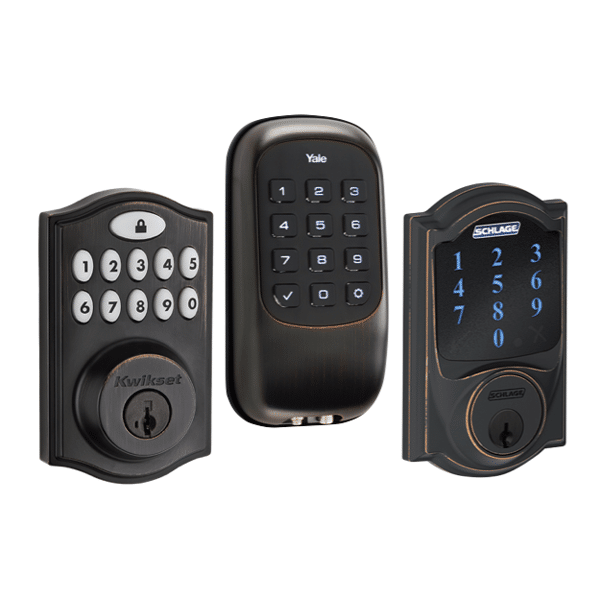


 Ca.garcia.s, CC BY-SA 4.0
